Code Archeology Field Guide
Every legacy codebase tells a story.
Some chapters are clear. Others are scratched into commit messages from 2013 or live inside a spreadsheet that still runs payroll. Modernization often starts like an excavation. You brush away dust, reveal layers, and decide what to preserve and what to haul away.
Here is a short field guide from real digs across COBOL jobs, .NET monoliths, and Java 6 services.
What we usually uncover
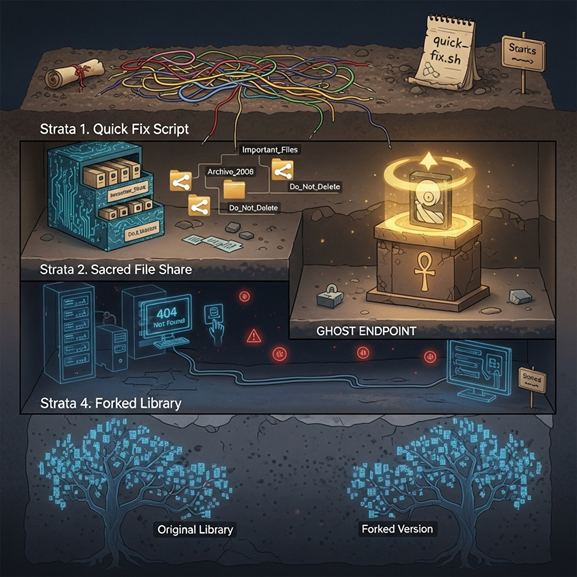
Strata 1. The quick fix that became culture
A script named final_v7.py runs nightly and fixes data "just in case." No one owns it. Turning it off breaks a quarter's close.
Strata 2. The sacred file share
PDFs and CSVs appear on a mapped drive. Jobs assume the path exists. Cloud plans fail because a server mount is a hidden dependency.
Strata 3. The ghost endpoint
A public API route still exists for a partner that churned years ago. It adds headers, retries, and a few milliseconds to every call.
Strata 4. The fork that forgot its origin
A library was copied into the repo, then changed locally. Upgrading the ecosystem now means reconciling two histories.
None of this is "bad code." It is sediment from years of survival.
How to excavate without breaking the temple
Start with a context map, not opinions
Inventory jobs, endpoints, queues, file paths, and database objects. Overlay runtime evidence from logs and traces. If it never runs, mark it cold. If it spikes at month end, mark it hot.
Preserve intent before changing implementation
Write down what a job or endpoint is supposed to achieve in plain language. Capture two or three sample inputs and outputs. That becomes your parity contract.
Move by artifact, not by folder
Extract one capability at a time. Keep the same interface at the edge. Route calls through a thin adapter while you change the engine behind it.
Give yourself a safe lane
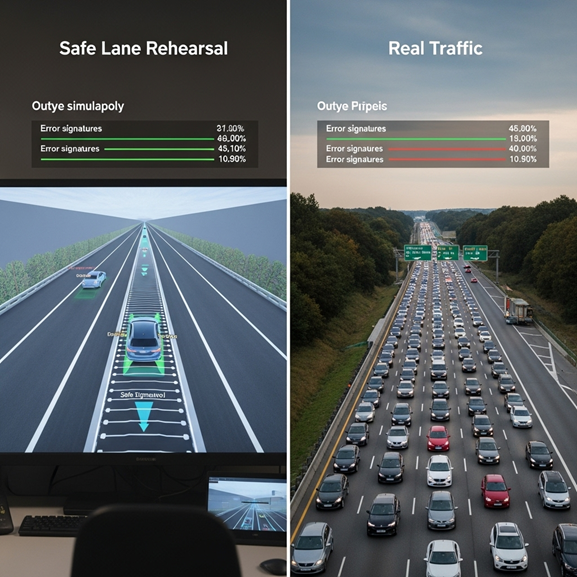
Rehearse in a mirror. Replay real traffic. Compare outputs and error signatures. When the new path matches the old, shift five percent of live traffic. Increase as confidence grows.
What we keep and what we retire
Keep
- Proven business rules with a clear owner
- Interfaces that external consumers rely on
- Tests that reflect how people actually use the system
Retire
- Jobs that write and then immediately overwrite
- Ghost routes with no real traffic for months
- Forked libraries that block upgrades
- Local file assumptions that make cloud impossible
The point is not to polish everything. The point is to protect what earns money and remove what steals time.
A small story
A retailer asked why inventory reconciliations spiked page volume on Fridays. The dig took one morning. The job loaded late partner files from a server share, called a forked HTTP client, and patched rows with a spreadsheet macro if counts did not match. We kept the rule that reconciled counts. We retired the share and macro, restored a clean client, and added a guard that normalized the partner's drifting date format. Friday pages stopped. No rewrite required.
Where LensHub helps without getting in the way
LensHub automates the boring parts of the dig. It builds the code and runtime map, flags shadow systems, and ranks hotspots by traffic, churn, and coupling. It generates parity examples from real requests and sets up a mirror so you can compare old and new outputs in one view. During cutover, it watches both paths and keeps a change timeline you can hand to auditors and leadership. Your team stays in control. Guesswork goes down.
Closing thought
Treat legacy like a site of value, not a mess to bulldoze. Brush, label, preserve intent, and move one artifact at a time. The result is a system that reads like living history and behaves like modern software.
Start Your Code Archeology Journey
If you want a two hour "site survey" on your codebase, ask for a LensHub Map Sprint. You will finish with a dig plan, a first artifact to move, and the safety nets to do it calmly.