.NET Framework to .NET 8 Migration Guide
Moving a live product off .NET Framework 4.x sounds like a release freeze waiting to happen.
It does not have to be. You can land on .NET 8 and keep your Friday ship ritual. The trick is to treat the upgrade like running two lanes of traffic, not a single road closure.
Below is a field guide you can hand to your team. It favors clear steps over theory, keeps jargon light, and focuses on what protects your schedule.
The two-lane model
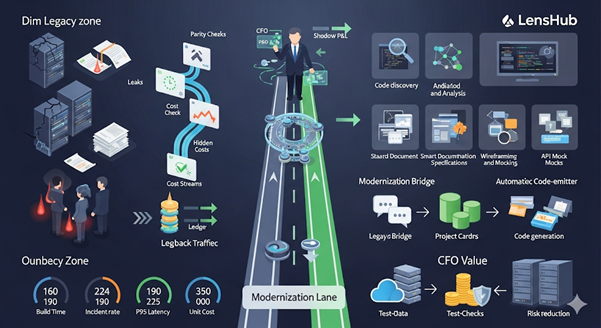
Think in lanes.
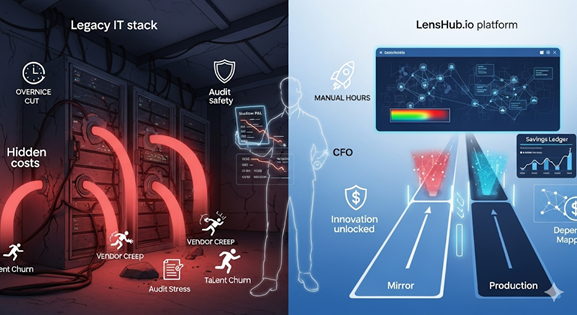
Grey lane is your current app on .NET Framework. It keeps serving users and getting small features.
Green lane is the same app compiled and exercised on .NET 8. It starts empty, then takes more of the load as confidence grows.
Releases continue from the grey lane while the green lane learns to match behavior. When the green lane proves itself, you move more traffic to it. No big switch. No long freeze.
Four jobs before touching code
Make a simple reality map
List the things that tie you to Windows and the full framework. Look for:
- WCF services
- System.Web dependencies
- COM or GAC usage
- Registry reads and file paths
- 32-bit only components
- Scheduled tasks on a server
- Local printers and network shares
Draw the call paths that make money
Mark the endpoints and jobs that carry revenue and compliance. These are your guardrails. They must match exactly in the green lane before any cutover.
Test the contract, not the internals
Capture a small set of request and response pairs for public APIs and key jobs. These become your parity tests. If the green lane returns the same outputs for the same inputs, you are on track.
Box the Windows specific pieces
Wrap file IO, printers, COM, and registry reads behind small adapters. This will let you replace them one by one without touching business logic.
A twelve-week plan that keeps Fridays green
You can adjust the tempo, but this pattern works for most teams.
Weeks 1–2: Set the stage
- Create the green lane build in CI that compiles the solution on .NET 8.
- Stand up a staging environment for the green lane.
- Add parity tests for the top five revenue endpoints and the top two nightly jobs.
- Externalize configuration and secrets so both lanes read from the same sources.
Weeks 3–4: Remove the obvious anchors
- Replace legacy logging and DI with modern equivalents that work in .NET 8.
- Isolate or replace WCF at the edges. If you must keep it for now, hide it behind an adapter.
- Move scheduled tasks to a managed scheduler.
- Keep releasing features from the grey lane.
Weeks 5–6: First end-to-end path
- Pick one user path that matters and is small enough to finish.
- Run shadow traffic to the green lane for that path. Compare responses.
- Fix diffs. Do not touch production behavior yet.
- Publish a short "what changed and why" note for on-call.
Weeks 7–8: Start shifting slices
- Send 5 percent of real traffic for the chosen path to the green lane.
- Watch error rates, latency, and logs.
- If healthy, step up to 25 percent. If not, switch back in one click and fix.
Weeks 9–10: Grow coverage
- Add more endpoints and one background job to the green lane.
- Repeat the same 5 percent to 25 percent steps.
- Keep grey lane releases small and boring.
Weeks 11–12: Default to green
- Move the chosen paths to 100 percent in the green lane.
- Capture the wins in build time, startup, p95 latency, and incident count.
- Plan the next batch.
At no point do you pause releases. The lanes move in parallel. Rollback is always a route change, not a weekend war room.
What will likely bite you and simple fixes
WCF
If you cannot drop it yet, hide it behind a thin REST or gRPC façade so the rest of the code can move. Replace the backend later.
System.Web and classic ASP.NET
Migrate controllers to modern routing. Keep routes and payload shapes stable. Use contract tests to lock behavior.
COM and GAC
Wrap calls behind interfaces. Replace with .NET packages or small services. Keep the same inputs and outputs while you swap the engine.
File paths and local shares
Move to object storage. Put paths in config. Add a checksum or count check so jobs can prove success.
Machine scheduled tasks
Move to a managed scheduler. Store history and alerts with your app logs.
32-bit only components
Keep a small 32-bit helper process behind an adapter while you source a 64-bit alternative.
Keep the safety nets visible
- Parity tests compare old and new outputs for the same inputs.
- Shadow traffic exercises the green lane without user impact.
- Canary sends a small slice of users to the green lane.
- Blue green lets you flip between lanes in seconds.
- Single dashboard shows health of both lanes so on-call is never guessing.
How to talk about this with finance and product
Skip deep runtime talk. Show movement and risk control.
- Lead time for changes in the green lane
- Rollback time measured in minutes, not meetings
- Incident count before and after
- Unit cost per transaction for a modernized path
- Hiring impact since .NET 8 talent is easier to find
Share the same chart every week. Consistency builds trust.
What to move later
Not everything belongs in the first wave.
- Rare admin screens with low traffic
- Reports that rely on a legacy reporting engine
- Partner integrations that need legal coordination
- Any path with unclear ownership
Capture them on a backlog. Do not block the core upgrade on them.
A simple checklist you can reuse
- We can build and run both lanes in CI and staging
- We have parity tests for revenue and compliance paths
- We can send shadow traffic on demand
- We can canary 5 percent of users with one switch
- We can flip back in one switch
- We have one dashboard for both lanes
- We post a short note after each step so on-call learns with us
If any line is false, fix that first.
Where LensHub helps without taking over
LensHub scans your solutions and shows the pieces that pin you to .NET Framework. It highlights WCF, COM, GAC, System.Web, Windows only APIs, and shared state that will fight containers. It builds the call map for your revenue paths, generates parity tests from real traffic, and stands up a mirror so you can compare outputs line by line. During cutover, it watches both lanes, flags differences early, and keeps a timeline you can hand to leadership.
Your team stays in control. You get less guesswork and fewer surprises.
Closing
You can land on .NET 8 and keep shipping weekly. Use two lanes. Prove parity before you move traffic. Shift in slices. Keep rollback simple. Measure what leaders care about. Then repeat.
Plan Your .NET 8 Migration Today
If you want a one page lane plan for your app, ask for a .NET Upgrade Brief. We will map the blockers, pick a first path, and outline the steps that keep your Fridays green.